
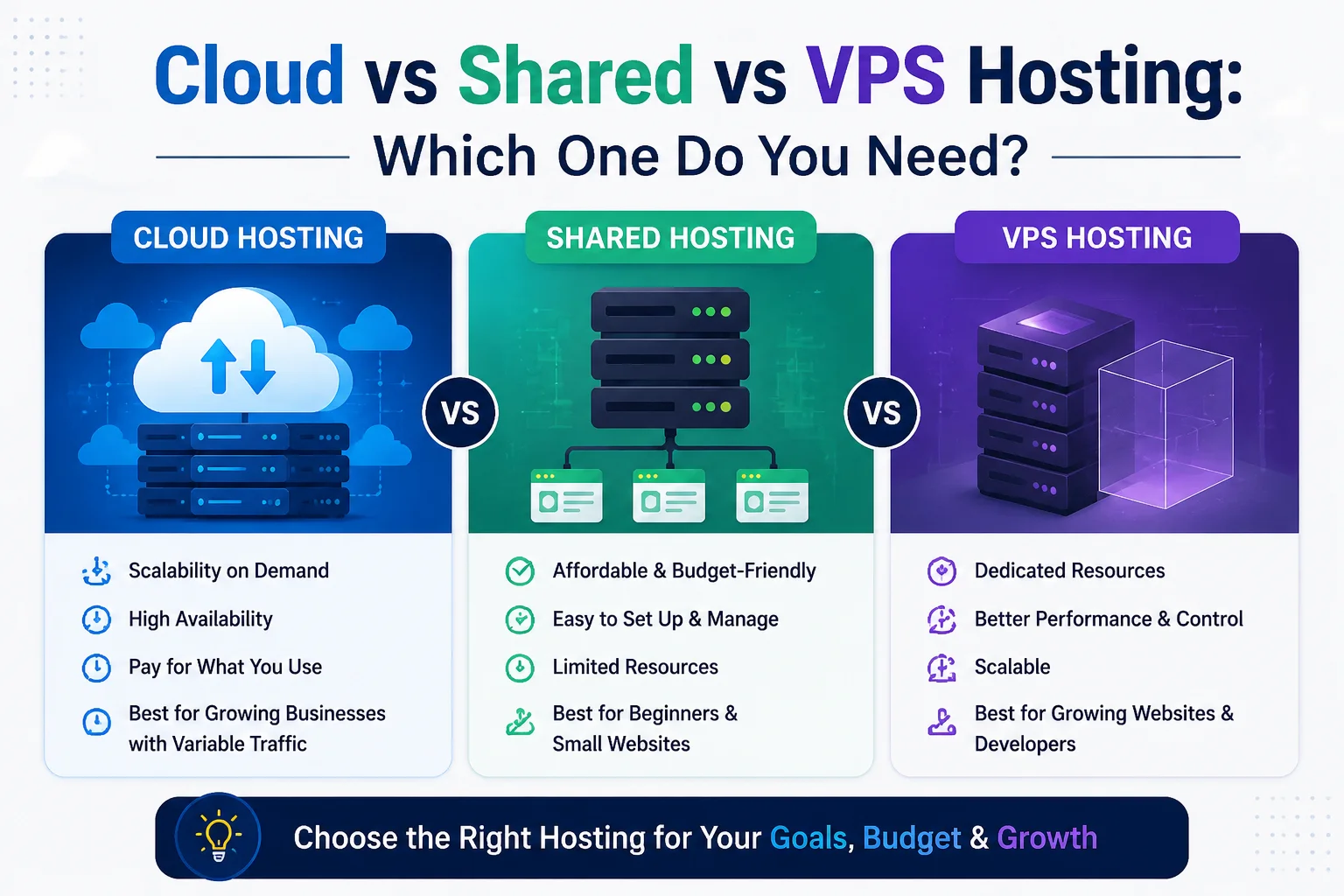
Cloud vs Shared vs VPS Hosting: Which One Do You Need?
A website can have excellent design, useful content, and a strong marketing strategy, but it still depends on the infrastructure behind it. Hosting affects how quickly pages respond, how much traffic the website can handle, how much control developers have, how easily resources can grow, and how much technical management the business needs to take on.
For many business owners, the choice becomes confusing because hosting companies use terms such as shared hosting, VPS, managed hosting, cloud servers, virtual machines, dedicated resources, and scalable infrastructure. Understanding Cloud vs Shared vs VPS Hosting makes the decision much easier because these options are designed for different levels of traffic, complexity, control, and growth.
The most expensive option is not automatically the right one. A small company website may run perfectly well on quality shared hosting. A growing e-commerce store may benefit from a VPS. A large application with unpredictable demand may justify cloud infrastructure. The goal is to match the hosting environment to what the website actually needs rather than paying for technology that provides little practical value.
What Does Web Hosting Actually Do?
Web hosting provides the computing resources needed to make a website or web application available online. When someone visits a website, a server processes the request and delivers the files, images, data, scripts, or application responses needed to display the page.
The IBM guide to web hosting explains that hosting options differ largely in how server resources such as CPU, memory, storage, and software are allocated between customers.
The central question in Cloud vs Shared vs VPS Hosting is therefore resource allocation.
Are you sharing almost everything with many websites? Do you have an isolated virtual environment with an allocated amount of resources? Or does your application run across flexible cloud infrastructure where resources can be provisioned and adjusted more dynamically?
Those differences influence cost, performance, scalability, and management.
What Is Shared Hosting?
Shared hosting is one of the simplest and usually most affordable forms of website hosting.
Multiple websites use the same physical server and share its resources. CPU, memory, storage, and server software are distributed across many customers. The hosting company usually handles the underlying server administration, which makes the service relatively easy for businesses without a technical team.
IBM describes shared hosting as an arrangement where several websites share server resources such as CPU, RAM, storage, and web-server software.
The biggest advantage is simplicity.
A business can purchase a package, connect a domain, install a CMS such as WordPress, and operate a normal website without managing an operating system or configuring the entire server.
The trade-off is that resources are shared.
If another account on the same environment consumes unusually high resources, the hosting provider has to manage the impact. Providers also place limits on CPU use, memory, storage, processes, traffic, and other resources to keep the shared environment stable.
For Cloud vs Shared vs VPS Hosting, shared hosting normally makes the most sense at the lower-complexity end: small company websites, portfolios, blogs, informational sites, and businesses with relatively predictable traffic.
What Is VPS Hosting?
VPS stands for Virtual Private Server.
A physical server is divided through virtualization into multiple isolated virtual environments. Several VPS customers may still share the underlying hardware, but each VPS operates more independently than a normal shared-hosting account.
IBM’s VPS explanation notes that each VPS can run its own operating system and receives an allocated portion of resources such as memory, processing capacity, storage, and CPU bandwidth.
This gives businesses more control.
Developers may be able to configure server software, choose operating-system settings, install applications, adjust security rules, run background services, and optimize the environment around the website or application.
Resources are also more predictable than standard shared hosting because an allocated virtual environment is not the same as placing many ordinary hosting accounts inside one shared control-panel environment.
However, additional control creates additional responsibility.
An unmanaged VPS may require someone to maintain the operating system, server software, firewall rules, security updates, backups, monitoring, and troubleshooting. Managed VPS hosting reduces that burden because the provider handles more server administration.
In Cloud vs Shared vs VPS Hosting, VPS often sits in the middle: more resources and control than shared hosting without requiring a business to rent an entire physical server.
What Is Cloud Hosting?
Cloud hosting uses virtualized computing infrastructure rather than depending entirely on one traditional server setup.
AWS explains cloud hosting as hosting applications or websites on virtual servers running across cloud infrastructure. Resources can be provisioned from an existing pool and adjusted as demand changes.
This flexibility is one of the biggest differences.
A traditional hosting plan may have a fixed resource ceiling. With cloud infrastructure, a business can often increase compute, memory, storage, or the number of application instances as its requirements change.
Cloud architecture can also be designed for greater availability. Instead of making one server responsible for everything, larger systems can distribute workloads between multiple servers, availability zones, databases, load balancers, storage systems, and other services.
However, “cloud” does not automatically mean unlimited performance or zero downtime. Architecture still matters. Poorly configured cloud infrastructure can be expensive, complicated, and unreliable.
In Cloud vs Shared vs VPS Hosting, cloud hosting provides the greatest architectural flexibility, but businesses should use that flexibility only when their applications genuinely benefit from it.
Quick Comparison
A useful way to understand Cloud vs Shared vs VPS Hosting is to compare the practical differences.
Factor | Shared Hosting | VPS Hosting | Cloud Hosting |
Resources | Shared between many accounts | Allocated virtual resources | Flexible virtual/cloud resources |
Cost | Usually lowest | Moderate | Can range from low to substantial |
Technical control | Limited | High | Potentially very high |
Scalability | Limited by hosting plan | Can upgrade within provider limits | Designed for flexible scaling |
Server management | Usually provider-managed | Managed or self-managed | Depends on service architecture |
Performance consistency | Suitable for lighter workloads | More predictable resources | Can support demanding workloads |
Custom software | Limited | Much greater flexibility | Extensive flexibility |
Traffic spikes | Limited tolerance | Better with suitable resources | Can be designed for dynamic demand |
Best fit | Small sites and simple business websites | Growing sites, stores, applications | High-growth, complex, or variable workloads |
The table is a starting point. Two providers can sell products under the same label while offering very different resources, support, backup policies, and management levels.
Always compare the actual service specification rather than the product name alone.
1. Cost: Do Not Pay for Infrastructure You Do Not Need
Hosting prices can vary widely.
Shared hosting is usually inexpensive because many customers share the cost of one infrastructure environment.
A VPS costs more because each customer receives a more isolated environment and allocated resources.
Cloud hosting can follow several pricing models. Some services offer predictable monthly packages, while larger infrastructure providers may charge according to compute time, storage, traffic, databases, backups, and other services.
AWS cloud hosting guidance explains that cloud resources can be scaled according to demand rather than requiring businesses to purchase physical infrastructure in advance.
When evaluating Cloud vs Shared vs VPS Hosting, look beyond the monthly headline price.
Consider technical management, backups, security, monitoring, migration, bandwidth, support, licenses, control panels, database services, and recovery.
A $10 hosting package that requires constant troubleshooting can become more expensive than a $40 managed service that works reliably.
At the same time, a five-page company website does not need enterprise cloud architecture simply because the company wants to appear technologically advanced.
Match spending to business risk.
2. Performance: Hosting Is Only One Part of Speed
Hosting matters for performance, but changing servers will not fix every slow website.
Large images, heavy scripts, poorly coded plugins, inefficient database queries, third-party advertising tools, and badly designed pages can remain slow even on expensive infrastructure.
Google’s page experience guidance recommends looking at the overall user experience, including Core Web Vitals, secure delivery, and mobile usability.
In Cloud vs Shared vs VPS Hosting, VPS and cloud environments generally provide more resources and greater optimization options than entry-level shared hosting.
That difference matters most when the website is actually resource-constrained.
If the server is constantly reaching CPU or memory limits, moving to a better environment can improve reliability.
If a 12 MB homepage image is creating the delay, changing hosting alone does not solve the underlying issue.
Performance reviews should therefore look at both application optimization and infrastructure.
3. Scalability: What Happens When Traffic Grows?
Imagine a website normally receives 500 visitors a day.
Then a social-media post goes viral and 20,000 people arrive within a few hours.
What happens?
With entry-level shared hosting, the account may reach resource limits.
A properly sized VPS can handle more demand, but it still has an allocated capacity. If the site outgrows that capacity, the server may need to be upgraded.
Cloud architecture can be designed to respond more flexibly.
AWS describes scalability as one of the main advantages of cloud hosting because computing resources can be increased or reduced according to demand.
This makes scalability one of the strongest differences in Cloud vs Shared vs VPS Hosting.
However, automatic scaling does not happen magically simply because a hosting provider uses the word “cloud.” Applications, databases, storage, sessions, caching, load balancing, and deployment processes may need to be designed for scaling.
Ask the provider exactly what happens when your traffic exceeds normal levels.
4. Control and Customization
Shared hosting is designed to be convenient.
That means the provider decides most server-level settings. Customers usually manage websites through a control panel rather than controlling the full operating system.
For many businesses, that is an advantage.
A local accounting firm should not need a Linux administrator simply to keep its website online.
VPS hosting gives developers more freedom. They can often install specific server packages, run different versions of software, configure background processes, manage firewall settings, and optimize services.
Cloud platforms can provide even deeper architectural control, including virtual networks, managed databases, object storage, load balancers, containers, serverless components, and automated infrastructure.
The question in Cloud vs Shared vs VPS Hosting is how much control the business genuinely needs.
More control also means more opportunities to configure something incorrectly.
5. Security Depends on More Than Hosting Type
Businesses sometimes assume VPS or cloud hosting is automatically secure because the environment is more isolated.
Isolation helps, but it does not remove security responsibilities.
A VPS with an outdated operating system, exposed administrative ports, weak passwords, and no monitoring can be less secure than professionally managed shared hosting.
Cloud infrastructure also needs proper identity management, network configuration, patching, encryption, monitoring, backups, and access controls.
The OWASP Top 10 provides a useful overview of common web application risks. Many problems occur at the application or configuration level rather than being solved simply by purchasing a different server.
In Cloud vs Shared vs VPS Hosting, the most secure option is normally the one that combines appropriate isolation with competent management.
Ask who is responsible for updates.
Ask who monitors security.
Ask how backups work.
Ask what happens after a compromise.
The answers matter more than a marketing label.
6. Managed vs Unmanaged Hosting Can Change the Decision
Two VPS plans with similar CPU and memory can provide completely different experiences.
One may be unmanaged. The customer receives a server and is responsible for almost everything above the underlying infrastructure.
The other may be fully managed. The hosting company handles operating-system updates, server configuration, monitoring, security patches, backups, and technical troubleshooting.
Cloud services have similar differences. Infrastructure-as-a-service gives technical teams considerable control, while managed platforms handle more of the underlying administration.
This is an important part of Cloud vs Shared vs VPS Hosting because many businesses do not actually need more server control. They need better performance without becoming responsible for server administration.
Before choosing a plan, ask exactly what “managed” includes.
Does the provider update the operating system?
Does it manage the web server?
Are backups included?
Who responds if the server goes offline at 2 a.m.?
Will the provider troubleshoot WordPress, or only confirm that the server itself is running?
These details can matter more than CPU numbers.
7. Traffic Patterns Matter as Much as Traffic Volume
Average traffic can hide the real hosting requirement.
A ticketing website may receive little traffic most of the month but enormous demand when tickets go on sale.
An e-commerce store may experience major peaks during promotions.
A school portal may become busy when examination results are published.
A business application may receive most of its activity during office hours.
When comparing Cloud vs Shared vs VPS Hosting, consider both average demand and peak demand.
Shared hosting can work well when traffic is low and predictable.
A VPS provides a stronger fixed environment for sustained workloads.
Cloud infrastructure is particularly useful when demand changes dramatically and the system has been designed to scale around those changes.
Do not purchase infrastructure based only on one monthly visitor number.
Understand when customers arrive and what they do when they get there.
8. E-Commerce Websites Need More Than Page Views
An online store with 5,000 monthly visitors may require more resources than a blog with 50,000.
Why?
Because e-commerce requests can involve database queries, product search, filters, customer accounts, carts, inventory, payment processing, order management, and personalized content.
Caching also becomes more complicated because one customer’s checkout cannot simply be served to another customer.
In Cloud vs Shared vs VPS Hosting, a small new store may still operate effectively on quality shared or managed hosting. As orders, products, integrations, and traffic increase, a VPS or cloud environment may provide better control and consistency.
The decision should be based on transaction complexity and peak load, not only page views.
For businesses developing online stores, KM Software Services Web Development covers custom web and e-commerce solutions alongside hosting and ongoing technical support.
9. Backups and Disaster Recovery Need Their Own Plan
A hosting company advertising backups does not automatically mean the business has a complete recovery strategy.
Ask how frequently backups run.
Ask where they are stored.
Ask how many historical copies exist.
Ask whether the database and website files are both included.
Ask how long restoration normally takes.
Ask whether backups remain available if the hosting account itself has a serious problem.
Cloud infrastructure can support sophisticated disaster-recovery designs, but those systems need to be configured.
A VPS can also use remote backups and snapshots.
Even simple shared hosting can provide reliable recovery when the provider offers appropriate backup services.
The Cloud vs Shared vs VPS Hosting decision should therefore include recovery requirements, particularly for stores, membership systems, business software, and other websites where data changes continuously.
A backup from last month is far less useful if yesterday’s orders are important.
10. Does Hosting Affect SEO?
Hosting is not a shortcut to rankings.
Buying an expensive cloud plan does not automatically push a website above competitors.
However, hosting can influence conditions that affect the user experience and technical reliability.
A server that regularly becomes unavailable creates accessibility problems. Slow server responses can contribute to poor page performance. Weak infrastructure may struggle during traffic peaks.
Google’s current page experience documentation encourages site owners to provide strong overall experiences rather than focusing on a single technical measurement.
In Cloud vs Shared vs VPS Hosting, choose infrastructure that lets the website remain available and responsive for its real audience.
Then optimize the website itself.
Hosting and website performance work together.
11. When Shared Hosting Is Usually Enough
Shared hosting makes sense when the business has relatively simple requirements.
A small company website containing a homepage, service pages, About page, blog, and contact form may not need an isolated server.
The same applies to portfolios, early-stage websites, small blogs, campaign pages, and low-traffic information sites.
For Cloud vs Shared vs VPS Hosting, choose shared hosting when the website is lightweight, traffic is predictable, server-level customization is unnecessary, and convenience matters more than infrastructure control.
Quality still matters.
Look for reliable support, sensible resource limits, SSL, backups, security measures, modern software versions, and transparent upgrade paths.
Cheap hosting becomes expensive when the site is repeatedly unavailable.
12. When VPS Hosting Is Usually the Better Step
A VPS often makes sense when a website has outgrown ordinary shared hosting but does not need complex cloud architecture.
Typical signs include higher sustained traffic, resource-heavy applications, several websites, custom server requirements, background processes, larger databases, staging environments, or the need for more predictable resources.
VPS is also useful for developers who need control over the server stack.
Within Cloud vs Shared vs VPS Hosting, VPS provides a useful middle ground because the business can gain isolation and flexibility without moving immediately into a more complex distributed cloud architecture.
If the company has no server-management expertise, consider managed VPS hosting.
The extra management fee can be far cheaper than recovering from a poorly maintained server.
13. When Cloud Hosting Makes More Sense
Cloud hosting becomes attractive when flexibility, availability, and scaling are important to the application.
It can be suitable for SaaS products, high-traffic platforms, applications with major traffic spikes, business-critical software, multi-region services, large e-commerce systems, APIs, and applications expected to grow rapidly.
Cloud services can also support managed databases, distributed storage, automated scaling, deployment pipelines, disaster recovery, and other infrastructure beyond a single server.
In Cloud vs Shared vs VPS Hosting, cloud is usually most valuable when those capabilities solve a real problem.
Do not migrate a stable five-page business website to a complicated cloud architecture just because cloud computing is modern.
Complexity should earn its place.
A Practical Way to Make the Decision
Before purchasing hosting, document the website’s current traffic, peak traffic, storage requirements, database usage, applications, expected growth, technical expertise, security needs, downtime tolerance, backup requirements, and budget.
Then consider what happens during failure.
Can the business tolerate several hours offline?
Would losing a day’s database changes matter?
Does the company have somebody who understands server administration?
Does traffic remain stable, or does it spike?
Does the application require special software?
Those answers make Cloud vs Shared vs VPS Hosting much easier to evaluate than comparing marketing pages alone.
Also ask for an upgrade path.
A good hosting decision today should not trap the business tomorrow.
Can You Move From Shared to VPS or Cloud Later?
Yes.
Many websites naturally progress through different hosting environments as they grow.
A startup may begin with shared hosting because it is economical and easy to manage. Later, rising traffic or application requirements may justify a VPS. A larger platform may eventually move into cloud infrastructure.
Migration still requires planning.
Databases, DNS, emails, SSL certificates, files, scheduled tasks, applications, integrations, caching, and third-party services may all need attention.
Test the new environment before changing public traffic where possible.
Keep a rollback plan.
Schedule important migrations when business risk is manageable.
Growth does not mean the first hosting choice was wrong. Infrastructure should change when requirements change.
Final Thoughts
Hosting should support the website rather than becoming a source of unnecessary complexity.
The main lesson from Cloud vs Shared vs VPS Hosting is that each model has a sensible place.
Shared hosting offers affordability and convenience for smaller, simpler websites.
VPS hosting provides more predictable resources, isolation, and control for growing websites and applications.
Cloud hosting provides flexible infrastructure for workloads that need stronger scalability, availability, or architectural freedom.
Do not choose based only on price.
Do not choose based only on traffic.
And do not choose cloud infrastructure simply because the word “cloud” sounds advanced.
Look at customer demand, application complexity, security responsibilities, technical expertise, growth, recovery requirements, and the cost of downtime.
The right hosting solution is the one that gives the business enough performance and reliability without paying for complexity it cannot use.
Need Help Choosing the Right Hosting Environment?
If your website is growing, moving to a new server, or struggling with performance and reliability, KM Software Services provides web development, hosting, and ongoing maintenance support. KMSS currently offers secure hosting options across shared, VPS, and cloud environments, together with backups, security hardening, bug fixes, uptime monitoring, and performance maintenance. Businesses planning a new site can also explore KM Software Services Web Development to connect infrastructure decisions with the wider website architecture and long-term business requirements.
Useful Hosting Resources
- AWS: What Is Cloud Hosting? — a practical explanation of cloud hosting, virtualization, scalability, and differences from traditional hosting.
- IBM: What Is Web Hosting? — an overview of shared hosting, VPS hosting, and other web-hosting models.
- IBM: What Is a Virtual Private Server? — detailed guidance on VPS resources, virtualization, isolation, management, and common use cases.
- IBM: What Is Cloud Hosting? — useful comparisons between cloud, shared, VPS, and dedicated environments.
- Google: Understanding Page Experience — guidance on page experience, Core Web Vitals, mobile usability, and secure website delivery.
- OWASP Top 10 — an authoritative overview of common web application security risks.
- KM Software Services FAQs — information about KMSS hosting, cloud infrastructure, development, integrations, backups, and support.
- KM Software Services Web Development — custom web development and wider technical support for business websites and applications.